Rumahweb
Perlu di ketahui bahwa VirtueMart adalah Open Source aplikasi e-commerce, yang dikembangkan untuk CMS Joomla. Dibuat dalam format PHP, sehingga dapat terintegrasi ke dalam setiap website E-commerce Joomla.
Artikel ini akan memandu Anda melakukan proses instalasi VirtueMart secara manual melalui account hosting. Virtuemart sendiri hadir dalam 2 versi Complete Package untuk joomla 1.5.x dan 1.0.x dan pembahasan akan diawali dulu dengan cara men-download ekstension tersebut hingga ke cara meng-instalnya.
Langkah pertama :
Pertama anda perlu men-download lengkap manual instalasi paket VirtueMart yang tersedia di sini. Dan menyimpan paket-download ke hard drive anda.
Langkah kedua :
Mengekstrak arsip file “VirtueMart_Manual-Instalasi-Package_1.x.tar.gz” menggunakan WinRAR atau WinZip pada hard drive, dan akan terlihat isi dari file tersebut seperti di bawah ini

* / Administrator
* / Komponen
* / Modul
* / Plugins >> komponen virtuemart 1.5
* / Mambots >> komponen virtuemart 1.0
Terlihat merupakan bagian dalam struktur direktori pada instalasi Joomla.
Langkah Ketiga :
Mengupload file tersebut kedalam direktori joomla di account hosting Anda yang bisa dilihat panduan kami pada artikel mengenai cara upload file yang kami buat sebelumnya.
Secara detail bisa dilihat seperti dibawah ini
*/ Administrator
di upload ke file manager / public_html/administrator /
*/ Komponen
di upload ke / public_html/components /
*/ Modules
di upload ke / public_html /modules /
Untuk versi Joomla! 1.5.x :
*/ Plugins
di upload ke / public_html /plugins /
Untuk versi Joomla! 1.0.x
*/ Mambots
di upload ke / public_html /mambots /
Setelah semuanya terupload kemudian lanjut ke langkah berikutnya,
Langkah Keempat :
Login ke halaman backend administrator Joomla “”Http://www.namadomain.com/administrator/”” setelah login anda akan melihat url pada browser anda seperti dibawah ini
http://www.namadomain.com/administrator/index2.php (pada joomla 1.0.x)
http://www.namadomain.com/administrator/index.php (pada joomla 1.5.x )
yang perlu anda lakukan melakukan instalasi komponen secara manual dengan menambahkan “?option=com_virtuemart” setelah index2.php / index.php pada browser,
Contoh :
http://www.namadomain.com/administrator/index2.php?option=com_virtuemart atau,
http://www.namadomain.com/administrator/index.php?option=com_virtuemart
(Tekan enter) Dan tunggulah beberapa saat sampai Anda melihat tampilan konfirmasi keberhasilan proses instalasi , bisa dilihat seperti di bawah ini
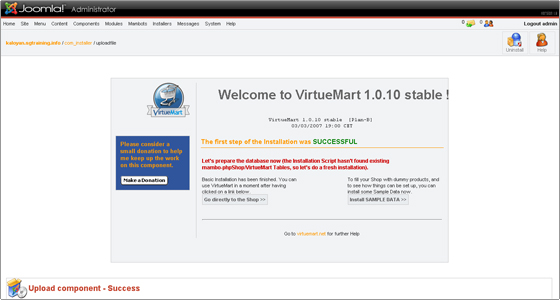
Di tampilan browser anda akan terlihat 2 pilihan
“GO DIRECTLY TO THE SHOP” jika ingin menuju masuk ke halaman toko/virtuemart
Atau
“ INSTALL SAMPLE DATA” jika Anda ingin memiliki beberapa contoh produk dan kategori
Langkah Kelima :
Masuk kehalaman phpmyadmin pada account hosting Anda dan pilih database untuk instalasi joomla tersebut. Pilih “SQL” pada toolbar di bagian tengah atas. Kemudian jalankan approriate SQL kode berikut :
Perlu diperhatikan !!!!
Untuk versi Joomla 1.0.x tambahkan/insert pada table modules dan mambots ( dbprefix jos_ )
[PHP]
INSERT IGNORE INTO `jos_modules` (`title`, `content`, `ordering`, `position`, `checked_out`, `checked_out_time`, `published`, `module`, `numnews`, `access`, `showtitle`, `params`, `iscore`, `client_id`) VALUES ( ‘VirtueMart Module’, ”, 99, ‘left’, 0, ‘0000-00-00 00:00:00’, 1, ‘mod_virtuemart’, 0, 0, 1, ”, 0, 0);
INSERT IGNORE INTO `jos_modules` (`title`, `content`, `ordering`, `position`, `checked_out`, `checked_out_time`, `published`, `module`, `numnews`, `access`, `showtitle`, `params`, `iscore`, `client_id`) VALUES ( ‘VirtueMart Login’, ”, 99, ‘left’, 0, ‘0000-00-00 00:00:00’, 0, ‘mod_virtuemart_login’, 0, 0, 1, ”, 0, 0);
INSERT IGNORE INTO `jos_modules` (`title`, `content`, `ordering`, `position`, `checked_out`, `checked_out_time`, `published`, `module`, `numnews`, `access`, `showtitle`, `params`, `iscore`, `client_id`) VALUES ( ‘VirtueMart TopTen Products’, ”, 99, ‘left’, 0, ‘0000-00-00 00:00:00’, 0, ‘mod_virtuemart_topten’, 0, 0, 1, ”, 0, 0);
INSERT IGNORE INTO `jos_modules` (`title`, `content`, `ordering`, `position`, `checked_out`, `checked_out_time`, `published`, `module`, `numnews`, `access`, `showtitle`, `params`, `iscore`, `client_id`) VALUES ( ‘VirtueMart Product Scroller’, ”, 99, ‘left’, 0, ‘0000-00-00 00:00:00’, 0, ‘mod_productscroller’, 0, 0, 1, ”, 0, 0);
INSERT IGNORE INTO `jos_modules` (`title`, `content`, `ordering`, `position`, `checked_out`, `checked_out_time`, `published`, `module`, `numnews`, `access`, `showtitle`, `params`, `iscore`, `client_id`) VALUES ( ‘VirtueMart Product Categories’, ”, 99, ‘left’, 0, ‘0000-00-00 00:00:00’, 0, ‘mod_product_categories’, 0, 0, 1, ”, 0, 0);
INSERT IGNORE INTO `jos_modules` (`title`, `content`, `ordering`, `position`, `checked_out`, `checked_out_time`, `published`, `module`, `numnews`, `access`, `showtitle`, `params`, `iscore`, `client_id`) VALUES ( ‘VirtueMart All-In-One’, ”, 99, ‘left’, 0, ‘0000-00-00 00:00:00’, 0, ‘mod_virtuemart_allinone’, 0, 0, 1, ”, 0, 0);
INSERT IGNORE INTO `jos_modules` (`title`, `content`, `ordering`, `position`, `checked_out`, `checked_out_time`, `published`, `module`, `numnews`, `access`, `showtitle`, `params`, `iscore`, `client_id`) VALUES ( ‘VirtueMart Cart’, ”, 99, ‘left’, 0, ‘0000-00-00 00:00:00’, 0, ‘mod_virtuemart_cart’, 0, 0, 1, ”, 0, 0);
INSERT IGNORE INTO `jos_modules` (`title`, `content`, `ordering`, `position`, `checked_out`, `checked_out_time`, `published`, `module`, `numnews`, `access`, `showtitle`, `params`, `iscore`, `client_id`) VALUES ( ‘VirtueMart Featured Products’, ”, 99, ‘left’, 0, ‘0000-00-00 00:00:00’, 0, ‘mod_virtuemart_featureprod’, 0, 0, 1, ”, 0, 0);
INSERT IGNORE INTO `jos_modules` (`title`, `content`, `ordering`, `position`, `checked_out`, `checked_out_time`, `published`, `module`, `numnews`, `access`, `showtitle`, `params`, `iscore`, `client_id`) VALUES ( ‘VirtueMart Latest Products’, ”, 99, ‘left’, 0, ‘0000-00-00 00:00:00’, 0, ‘mod_virtuemart_latestprod’, 0, 0, 1, ”, 0, 0);
INSERT IGNORE INTO `jos_modules` (`title`, `content`, `ordering`, `position`, `checked_out`, `checked_out_time`, `published`, `module`, `numnews`, `access`, `showtitle`, `params`, `iscore`, `client_id`) VALUES ( ‘VirtueMart Manufacturers’, ”, 99, ‘left’, 0, ‘0000-00-00 00:00:00’, 0, ‘mod_virtuemart_manufacturers’, 0, 0, 1, ”, 0, 0);
INSERT IGNORE INTO `jos_modules` (`title`, `content`, `ordering`, `position`, `checked_out`, `checked_out_time`, `published`, `module`, `numnews`, `access`, `showtitle`, `params`, `iscore`, `client_id`) VALUES ( ‘VirtueMart Random Products’, ”, 99, ‘left’, 0, ‘0000-00-00 00:00:00’, 0, ‘mod_virtuemart_randomprod’, 0, 0, 1, ”, 0, 0);
INSERT IGNORE INTO `jos_modules` (`title`, `content`, `ordering`, `position`, `checked_out`, `checked_out_time`, `published`, `module`, `numnews`, `access`, `showtitle`, `params`, `iscore`, `client_id`) VALUES ( ‘VirtueMart Search’, ”, 99, ‘left’, 0, ‘0000-00-00 00:00:00’, 0, ‘mod_virtuemart_search’, 0, 0, 1, ”, 0, 0);
INSERT IGNORE INTO `jos_mambots` (`name`, `element`, `folder`, `access`, `ordering`, `published`, `iscore`, `client_id`, `checked_out`, `checked_out_time`, `params`) VALUES (‘VirtueMart Product Snapshot’, ‘vmproductsnapshots’, ‘content’, 0, 0, 0, 0, 0, 0, ‘0000-00-00 00:00:00’, ”);
INSERT IGNORE INTO `jos_mambots` (`name`, `element`, `folder`, `access`, `ordering`, `published`, `iscore`, `client_id`, `checked_out`, `checked_out_time`, `params`) VALUES (‘VirtueMart Search’, ‘virtuemart.searchbot’, ‘search’, 0, 0, 0, 0, 0, 0, ‘0000-00-00 00:00:00’, ”);
INSERT IGNORE INTO `jos_mambots` (`name`, `element`, `folder`, `access`, `ordering`, `published`, `iscore`, `client_id`, `checked_out`, `checked_out_time`, `params`) VALUES (‘VirtueMart Xtd Search’, ‘vmxsearch.searchbot’, ‘search’, 0, 0, 0, 0, 0, 0, ‘0000-00-00 00:00:00’, ”);
[/PHP]
Untuk versi Joomla! 1.5.x tambahkan pada table modules dan plugins ( dbprefix jos_ )
[PHP]
INSERT IGNORE INTO `jos_modules` (`title`, `content`, `ordering`, `position`, `checked_out`, `checked_out_time`, `published`, `module`, `numnews`, `access`, `showtitle`, `params`, `iscore`, `client_id`) VALUES ( ‘VirtueMart Module’, ”, 99, ‘left’, 0, ‘0000-00-00 00:00:00’, 1, ‘mod_virtuemart’, 0, 0, 1, ”, 0, 0);
INSERT IGNORE INTO `jos_modules` (`title`, `content`, `ordering`, `position`, `checked_out`, `checked_out_time`, `published`, `module`, `numnews`, `access`, `showtitle`, `params`, `iscore`, `client_id`) VALUES ( ‘VirtueMart Login’, ”, 99, ‘left’, 0, ‘0000-00-00 00:00:00’, 0, ‘mod_virtuemart_login’, 0, 0, 1, ”, 0, 0);
INSERT IGNORE INTO `jos_modules` (`title`, `content`, `ordering`, `position`, `checked_out`, `checked_out_time`, `published`, `module`, `numnews`, `access`, `showtitle`, `params`, `iscore`, `client_id`) VALUES ( ‘VirtueMart TopTen Products’, ”, 99, ‘left’, 0, ‘0000-00-00 00:00:00’, 0, ‘mod_virtuemart_topten’, 0, 0, 1, ”, 0, 0);
INSERT IGNORE INTO `jos_modules` (`title`, `content`, `ordering`, `position`, `checked_out`, `checked_out_time`, `published`, `module`, `numnews`, `access`, `showtitle`, `params`, `iscore`, `client_id`) VALUES ( ‘VirtueMart Product Scroller’, ”, 99, ‘left’, 0, ‘0000-00-00 00:00:00’, 0, ‘mod_productscroller’, 0, 0, 1, ”, 0, 0);
INSERT IGNORE INTO `jos_modules` (`title`, `content`, `ordering`, `position`, `checked_out`, `checked_out_time`, `published`, `module`, `numnews`, `access`, `showtitle`, `params`, `iscore`, `client_id`) VALUES ( ‘VirtueMart Product Categories’, ”, 99, ‘left’, 0, ‘0000-00-00 00:00:00’, 0, ‘mod_product_categories’, 0, 0, 1, ”, 0, 0);
INSERT IGNORE INTO `jos_modules` (`title`, `content`, `ordering`, `position`, `checked_out`, `checked_out_time`, `published`, `module`, `numnews`, `access`, `showtitle`, `params`, `iscore`, `client_id`) VALUES ( ‘VirtueMart All-In-One’, ”, 99, ‘left’, 0, ‘0000-00-00 00:00:00’, 0, ‘mod_virtuemart_allinone’, 0, 0, 1, ”, 0, 0);
INSERT IGNORE INTO `jos_modules` (`title`, `content`, `ordering`, `position`, `checked_out`, `checked_out_time`, `published`, `module`, `numnews`, `access`, `showtitle`, `params`, `iscore`, `client_id`) VALUES ( ‘VirtueMart Cart’, ”, 99, ‘left’, 0, ‘0000-00-00 00:00:00’, 0, ‘mod_virtuemart_cart’, 0, 0, 1, ”, 0, 0);
INSERT IGNORE INTO `jos_modules` (`title`, `content`, `ordering`, `position`, `checked_out`, `checked_out_time`, `published`, `module`, `numnews`, `access`, `showtitle`, `params`, `iscore`, `client_id`) VALUES ( ‘VirtueMart Featured Products’, ”, 99, ‘left’, 0, ‘0000-00-00 00:00:00’, 0, ‘mod_virtuemart_featureprod’, 0, 0, 1, ”, 0, 0);
INSERT IGNORE INTO `jos_modules` (`title`, `content`, `ordering`, `position`, `checked_out`, `checked_out_time`, `published`, `module`, `numnews`, `access`, `showtitle`, `params`, `iscore`, `client_id`) VALUES ( ‘VirtueMart Latest Products’, ”, 99, ‘left’, 0, ‘0000-00-00 00:00:00’, 0, ‘mod_virtuemart_latestprod’, 0, 0, 1, ”, 0, 0);
INSERT IGNORE INTO `jos_modules` (`title`, `content`, `ordering`, `position`, `checked_out`, `checked_out_time`, `published`, `module`, `numnews`, `access`, `showtitle`, `params`, `iscore`, `client_id`) VALUES ( ‘VirtueMart Manufacturers’, ”, 99, ‘left’, 0, ‘0000-00-00 00:00:00’, 0, ‘mod_virtuemart_manufacturers’, 0, 0, 1, ”, 0, 0);
INSERT IGNORE INTO `jos_modules` (`title`, `content`, `ordering`, `position`, `checked_out`, `checked_out_time`, `published`, `module`, `numnews`, `access`, `showtitle`, `params`, `iscore`, `client_id`) VALUES ( ‘VirtueMart Random Products’, ”, 99, ‘left’, 0, ‘0000-00-00 00:00:00’, 0, ‘mod_virtuemart_randomprod’, 0, 0, 1, ”, 0, 0);
INSERT IGNORE INTO `jos_modules` (`title`, `content`, `ordering`, `position`, `checked_out`, `checked_out_time`, `published`, `module`, `numnews`, `access`, `showtitle`, `params`, `iscore`, `client_id`) VALUES ( ‘VirtueMart Search’, ”, 99, ‘left’, 0, ‘0000-00-00 00:00:00’, 0, ‘mod_virtuemart_search’, 0, 0, 1, ”, 0, 0);
INSERT IGNORE INTO `jos_plugins` (`name`, `element`, `folder`, `access`, `ordering`, `published`, `iscore`, `client_id`, `checked_out`, `checked_out_time`, `params`) VALUES (‘VirtueMart Product Snapshot’, ‘vmproductsnapshots’, ‘content’, 0, 0, 0, 0, 0, 0, ‘0000-00-00 00:00:00’, ”);
INSERT IGNORE INTO `jos_plugins` (`name`, `element`, `folder`, `access`, `ordering`, `published`, `iscore`, `client_id`, `checked_out`, `checked_out_time`, `params`) VALUES (‘VirtueMart Product Search’, ‘vmxsearch.plugin’, ‘search’, 0, 0, 0, 0, 0, 0, ‘0000-00-00 00:00:00’, ”);
[/PHP]
SEMOGA BERHASIL !!!! : )