


 Rumahweb
URL pada website sangat mempengaruhi hasil pencarian pada search engine. Semakin singkat atau unique link yang Anda buat, semakin baik juga menurut Google. Lalu, bagaimana cara mengganti URL di Joomla agar lebih SEO Friendly? Pada panduan ini, kami akan menjelaskannya untuk Anda.
Sebagai pengguna Joomla, pernahkah Anda memperhatikan URL di website Anda? Ya, secara default, artikel di Joomla menggunakan URL yang cukup panjang dan susah untuk di hafal. Karenanya, tautan memiliki peran penting tidak hanya untuk pelanggan Anda, tetapi juga untuk search engine.
URL yang terstruktur dengan baik tidak hanya membuat pengunjung Anda lebih mudah menemukan dan menghafal halaman di website Anda, tetapi juga memudahkan search engine dalam menganalisa struktur website Anda secara menyeluruh.
Pada panduan ini, kami akan menjelaskan tentang Search Engine Friendly URLs atau SEF pada Joomla. Dengan mengaktifkan fitur ini, Anda dapat meningkatkan peringkat website Anda di search engine seperti Bing dan Google. Berikut informasi selengkapnya.
Apa Itu Search Engine Friendly?
Fakta bahwa saat ini masih banyak situs web yang menggunakan tautan sistem default. Jika mereka hanya mematuhi dokumentasi pengembangan standar, maka komponen alamat web mereka mungkin akan terlihat seperti ini:
http://www.example.com/index.php?option=com_content&view=article&id=12:sample-article&catid=12&Itemid=126

URL ini hanyalah campuran karakter dan angka yang pada dasarnya sulit dibaca dan hampir mustahil untuk dihafal. Mereka mengambil kesempatan bagi webmaster untuk memasukkan kata kunci yang berharga dan karena itu sangat buruk untuk skor SEO pada website. Tapi bagaimana dengan yang satu ini?
http://www.situsanda.com/index.php/category/judul-artikel
Nah, URL baru tersebut dihasilkan dari fitur SEF URLs. Anda dapat melihat betapa tertata dan efisiennya itu!
Jadi secara kasar, “Search Engine Friendly (SEF) URLs” adalah salah satu fitur pengaturan SEO di Joomla yang bertugas mengganti campuran karakter dan angka yang dihasilkan oleh URL sistem default dengan URL komponen yang lebih bermakna dan mudah diingat.
Cara mengganti URL di Joomla
Berikut adalah cara mengganti URL di Joomla pada berbagai versi, agar permalnk website Anda lebih SEO Friendly.
Joomla 2.5
Berikut cara mengganti URL di Joomla 2.5 agar lebih seo friendly.
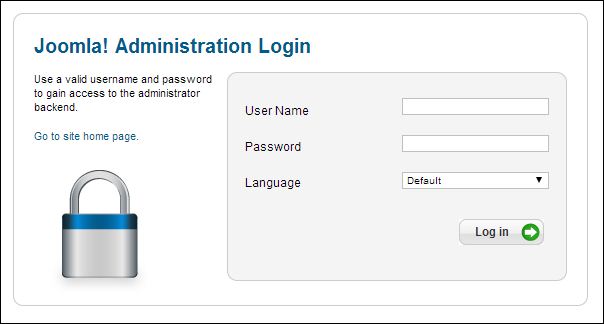
- Login administrator Joomla melalui URL https://namadomain/administrator
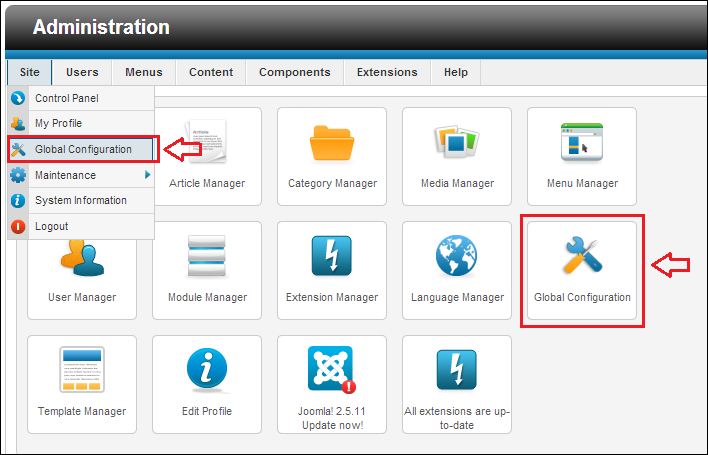
- Masuk ke menu “Global Configuration”.
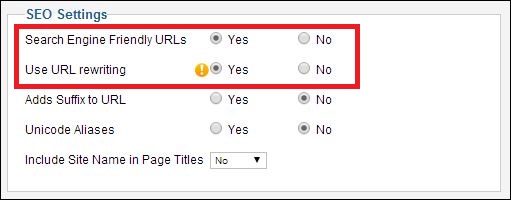
- Ubah “Search Engine Friendly URLs” dan “Use URL rewriting” menjadi “Yes”.
- Rename file “htaccess.txt” menjadi “.htaccess”. File ini berada di dokumen root installasi Joomla Anda, jika Anda meng-install Joomla pada domain utama maka letak file ini berada di folder “/home/usercpanel/public_html/”
Joomla 3.x
Berikut cara mengganti URL di Joomla 3 agar lebih seo friendly.
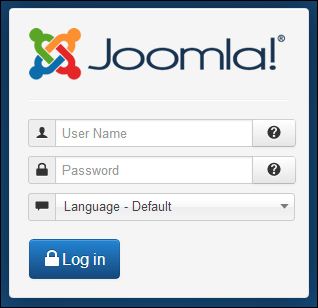
- Login administrator Joomla 3.X
- Masuk ke menu “System” > “Global Configuration”.

- Ubah “Search Engine Friendly URLs” dan “Use URL rewriting” menjadi “Yes”.

- Rename file “htaccess.txt” menjadi “.htaccess”. File ini berada di dokumen root installasi Joomla Anda, jika Anda meng-install Joomla pada domain utama maka letak file ini berada di folder “/home/usercpanel/public_html/”
Joomla 4.x
Berikut cara mengganti URL di Joomla 4 agar lebih seo friendly.
- Login administrator Joomla melalui url http://namadomain/administrator

- Masuk ke menu “System” > “Global Configuration”.

- Ubah “Search Engine Friendly URLs” dan “Use URL rewriting” menjadi “Yes”, Lalu Klik Save & Close.

- Rename file “htaccess.txt” menjadi “.htaccess”. File ini berada di dokumen root installasi Joomla Anda, jika Anda meng-install Joomla pada domain utama maka letak file ini berada di folder “/home/usercpanel/public_html/”
Demikian cara mengganti URL di Joomla agar lebih SEO Friendly. Semoga dengan ini, website Anda semakin mudah ditemukan di search engine.


